
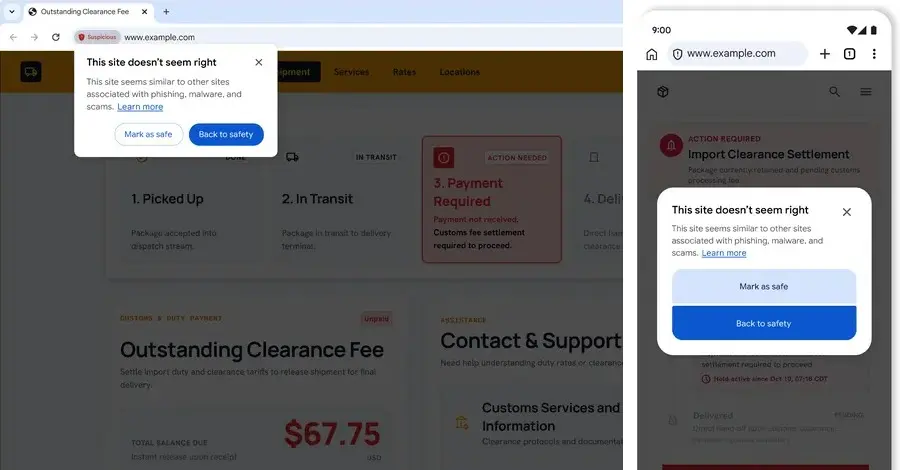
Google has announced the rollout of advanced safeguards within its Chrome web browser designed to protect users from an increasingly prevalent cyber threat known as "ClickFix" attacks, particularly when the browser’s Enhanced Protection mode is active. The security updates arrive as part of a broader industry push by major technology companies to fortify web browsing environments against sophisticated social engineering techniques, deceptive financial advertisements, and invasive cross-site tracking methods.
ClickFix has emerged among malicious actors as a remarkably effective social engineering technique because it fundamentally alters the dynamic of traditional phishing operations. Instead of attempting to exploit complex, zero-day software vulnerabilities or merely enticing a user to click on an unverified link, the attack strategy relies on tricking individuals into compromising their own systems. Unsuspecting users who navigate to legitimate websites that have been silently compromised, or those who interact with malicious online advertisements, are frequently redirected to fraudulent landing pages. These deceptive pages often display realistic-looking, yet entirely fake, verification prompts mimicking popular security infrastructure such as Cloudflare or Google reCAPTCHA, or they present non-existent system errors that demand immediate resolution.

The core instruction delivered by these scam pages commands the user to copy a specific block of code and paste it directly into the Windows Run dialog box or the macOS Terminal application to resolve the purported issue. Once the user pastes the command and presses the Enter key, a multi-stage infection chain is immediately initiated. This sequence rapidly deploys dangerous payloads, including information-stealing malware designed to harvest sensitive credentials or remote access trojans that grant unauthorized entities persistent control over the host machine. To successfully blend in with legitimate system activity and bypass basic security monitoring, these malicious commands frequently leverage native administration tools often referred to as living-off-the-land utilities, such as PowerShell or cmd.exe, to fetch subsequent stages of the attack.
A primary reason ClickFix continues to yield high success rates for cybercriminals is that it bypasses standard web defense mechanisms entirely. By shifting the download and execution vectors away from the browser environment and directly into the operating system terminal, attackers successfully circumvent existing browser-level download protections and Safe Browsing protocols. Google noted that to effectively combat this deceptive tactic, Chrome has been updated to automatically detect when a user with Enhanced Protection enabled has been manipulated into copying suspicious commands into their system clipboard.
Under this new defensive mechanism, if a user copies a potential ClickFix script, Chrome automatically sanitizes the clipboard payload by stripping away any personal information it might contain before transmitting the data securely to Safe Browsing for in-depth analysis. Should the security infrastructure determine that the copied command presents a genuine threat, Chrome immediately issues a warning prompt to the user. This intervention is engineered to break the kill chain and prevent the execution of the malicious command before the user can interact with their operating system terminal.

In tandem with these ClickFix countermeasures, Google is also introducing additional security features within Chrome to identify and neutralize online scams for users utilizing Enhanced Protection. This model dynamically evaluates page content in real-time, analyzing crucial indicators such as the specific brand being represented, the primary intent of the web page, and a calculated scam-likeliness score. This multi-layered analytical framework supplies the necessary threat intelligence required to accurately identify deceptive websites before they can inflict harm.
To address privacy concerns regarding the analysis of web page content, Google emphasized that Chrome minimizes data sharing by restricting text analysis exclusively to sites that exhibit high-confidence scam indicators. Furthermore, whenever page content is transmitted off the device for evaluation, it is processed ephemerally. This ensures that the data is never permanently logged, retained, or utilized for training machine learning models.
Beyond browser-level security improvements, Google is expanding its Financial Services Verification program to the United States and Canada. This policy aims to meticulously validate advertiser credentials and guarantee that all financial advertisements originate exclusively from authorized and regulated providers. The verification framework has previously been implemented across numerous global markets, including Australia, Brazil, India, Indonesia, Malaysia, New Zealand, Turkey, and several European nations. Under this regulatory standard, advertisers are legally and operationally required to demonstrate that they possess proper authorization from relevant government regulators or recognized registries prior to running financial ads. This requirement is intended to curb rampant brand impersonation and block malicious actors from targeting vulnerable consumers. To facilitate this rollout, Google is collaborating closely with industry bodies, partnering with the American Bankers Association in the United States to utilize a dedicated registry for verifying authorized banks, while engaging with the Canadian Bankers Association ahead of the Canadian expansion.

Concurrently, Apple has announced significant privacy enhancements integrated directly into Safari and WebKit across upcoming operating system releases for iOS, iPadOS, macOS, and visionOS. These updates introduce robust measures to block an insidious tracking practice known as identity resolution, which transforms ordinary user email addresses into persistent, unchangeable tracking identifiers. According to the WebKit development team, this tracking scheme involves third-party entities—distinct from the primary website owner—capturing a user’s email address invisibly when they log into a service or sign up for a newsletter.
Once collected, the email address is transmitted to external servers where an opaque tracking identifier is generated, permanently linked to the user’s email, and sent back to the host web page. This tracking ID is subsequently stored on the website and can be utilized indefinitely for arbitrary tracking purposes tied directly to the individual’s email, enabling continuous user profiling and targeted advertising across disparate web domains. Apple noted that actions such as logging out of an account or unsubscribing from a mailing list fail to eradicate the tracking identifier or the stored email address from the third-party servers.
As users continue to log in or submit forms containing personal information across the web, these third-party trackers progressively aggregate data, constructing extensive identity graphs encompassing names, residential addresses, telephone numbers, and IP addresses. To effectively shut down this form of cross-site tracking, Safari now blocks network access to identity resolution infrastructure embedded within web pages at the domain level, preventing third parties from transmitting captured email addresses back to their external servers. Apple emphasized that merely blocking traditional cross-site cookies is no longer sufficient in the modern threat landscape, as the tracking industry continues to adapt in the post-cookie era, necessitating deeper architectural protections to safeguard user privacy on the web.