Cybersecurity researchers have uncovered a sophisticated software supply chain attack that has successfully compromised official installation files for widely used Windows utilities Q-Dir and DesktopOK. The tainted packages were distributed directly through the official SoftwareOK website, exposing countless users to silent malware infections.
According to a detailed advisory published by South Korean cybersecurity firm AhnLab, the malicious tampering affected both fresh downloads and automated update mechanisms. Investigators found that unauthorized, modified installation files were generated and served not only when unsuspecting users downloaded the programs directly from the official download portal, but also during the internal update process of previously installed, legitimate software.
Q-Dir, frequently recognized as the Quad Directory Explorer, is a popular, lightweight alternative file manager for Windows environments developed by SoftwareOK. Alongside it, DesktopOK serves as a well-known, free utility designed specifically for Windows users to save, manage, and restore desktop icon positions after resolution changes or unexpected system reboots. Because of their utility and lightweight nature, both tools enjoy a broad user base among system administrators and everyday users alike, making them prime targets for supply chain compromise.

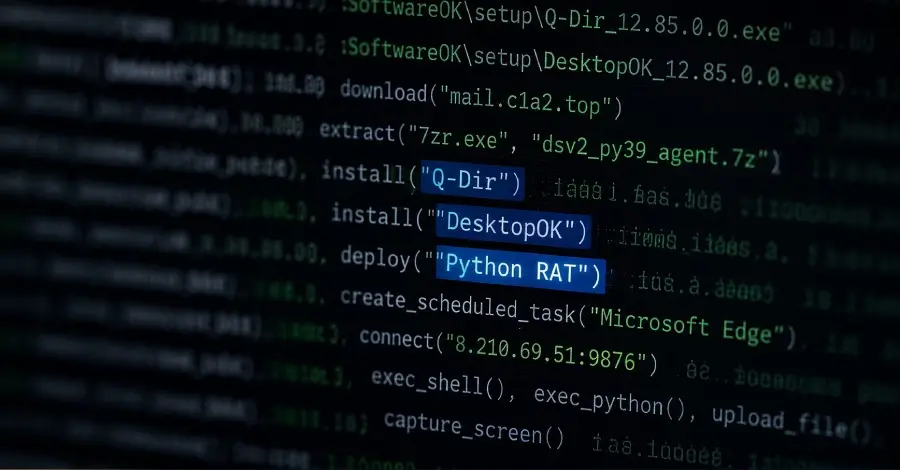
The unauthorized modifications introduced into the software installers were engineered with a high degree of stealth. The modifications ensure that the malicious activity remains extremely difficult to detect during standard program execution. While the utilities appear to run normally—minimizing user suspicion—they simultaneously reach out to an external server to retrieve and deploy a Python-based remote access Trojan, commonly known as a RAT.
Once successfully established on a host system, the RAT payload exhibits extensive capabilities. The malware empowers attackers to execute arbitrary shell commands and Python code, transfer files seamlessly across the network, capture live screenshots of the user’s desktop, and harvest comprehensive system metadata based on commands issued dynamically from an external controller.
While security analysts have confirmed that specific product versions of both Q-Dir and DesktopOK were poisoned—evidenced by glaring discrepancies in the SHA-256 hashes of the installer files and the inclusion of malicious code that triggers hidden downloads and automatic execution—the exact intrusion vector remains unknown. Researchers have yet to determine the precise mechanism that allowed threat actors to replace legitimate installation files with trojanized variants on the official infrastructure.
AhnLab researchers emphasized the deceptive nature of the attack, explaining that the malicious installer runs the legitimate Q-Dir or DesktopOK application to lower the user’s suspicion while quietly executing secondary scripts in the background. Specifically, this secondary phase involves fetching two distinct payloads from an external infrastructure hosted at the domain "mail.c1a2[.]top."

The subsequent attack chain relies on straightforward yet effective techniques. The compromised installer utilizes a legitimate 7-Zip binary tool to extract and launch the downloaded Python RAT package. To maintain a persistent foothold on the host machine, the malware establishes a scheduled task designed to impersonate Microsoft Edge, effectively blending in with legitimate operating system background processes to fly under the radar of casual observation. This scheduled task is specifically configured to execute the RAT by launching a Python script named "py_client_dsv2.py."
Upon execution, the RAT immediately initiates communication with its command-and-control server, located at "8.210.69[.]51:9876," to poll for tasks and execute incoming instructions. The malware supports a versatile suite of features tailored for deep system reconnaissance and control, mirroring the capabilities of advanced espionage toolkits.
A particularly notable aspect of the RAT’s routine involves environmental profiling. The malware actively compiles a comprehensive list of currently running processes on the infected machine. It then compares these processes against an extensive internal whitelist or blacklist of various security products and endpoint detection and response solutions. This internal database encompasses numerous prominent security vendors operating both in South Korea and internationally, including AhnLab, ESTSecurity, Hauri, CrowdStrike, SentinelOne, Trend Micro, Avast, McAfee, ESET, Symantec, Kaspersky, Bitdefender, Sophos, Fortinet, Elastic, and Malwarebytes.
Information regarding the identification of any running security programs is meticulously transmitted back to the command-and-control server. This intelligence allows the attackers to understand the defensive posture of the target network, enabling them to better plan subsequent stages of the intrusion or deploy tailored payloads capable of evading specific detection mechanisms.

At present, the campaign has not been formally attributed to any known advanced persistent threat group or cybercriminal collective. However, AhnLab analysts noted the presence of Chinese-language comments embedded within the recovered source code, suggesting that the malware authors or the operators behind the campaign operated within a Chinese-speaking development environment.
Security experts advise that individuals and organizations currently utilizing Q-Dir or DesktopOK, or those who have recently downloaded or updated these programs, should take immediate action. Users are urged to independently verify the cryptographic hash values of their downloaded installation files and thoroughly inspect their systems for any lingering traces of RAT installation, unauthorized background processes, or abnormal persistence mechanisms.
Furthermore, researchers caution that simply uninstalling and reinstalling the affected applications is insufficient, as it may leave an already deployed Python RAT intact on the system. Affected individuals must check for suspicious Python execution environments, hidden scheduled tasks, associated files, and network traces pointing to external communications. Security teams recommend updating antivirus and endpoint protection engines to the latest available definitions before conducting a comprehensive full-system scan.