
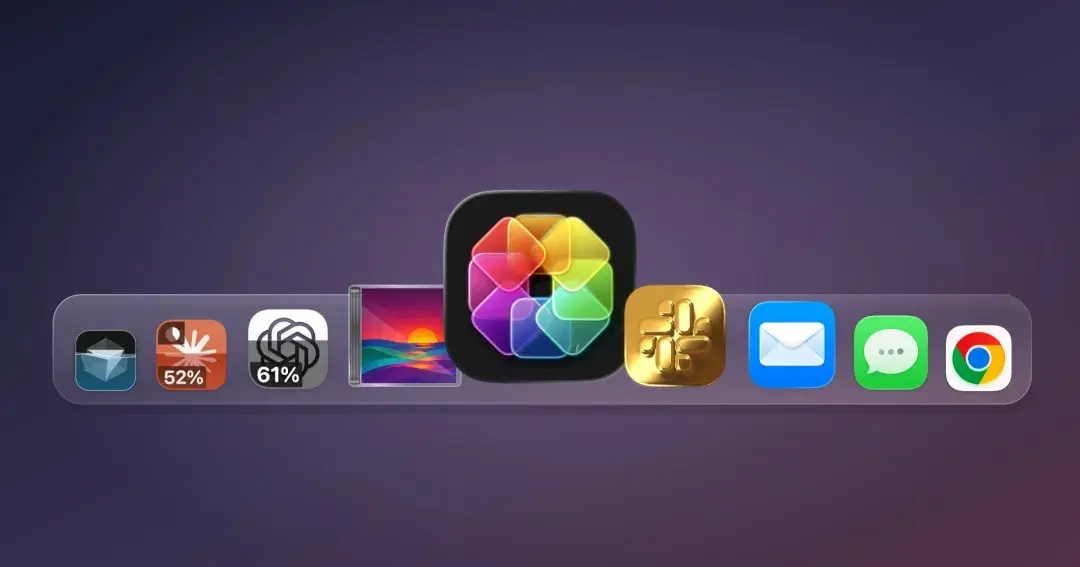
There is a brand-new way to keep an eye on your AI usage and monitor precisely when your daily limits reset, and it comes straight from your Mac’s app icons. While it might sound unorthodox at first, a newly launched utility is turning traditional desktop customization on its head by transforming static graphical elements into live, responsive data dashboards.
Designer Michael Flarup has officially launched IconSwapper, a novel macOS utility designed to let users replace any application’s official icon with custom creations, alternative designs, or fully dynamic graphical interfaces. Although the tool can be used purely for aesthetic enhancements like altering an icon’s appearance, shading, or design style, one of its most compelling use cases is far more functional. Users can swap out the standard icons for prominent AI applications like ChatGPT, Claude, and Cursor with specialized versions capable of displaying live, real-time AI usage statistics directly on the desktop.

Implementing the feature is designed to be straightforward, requiring no advanced technical background or complex scripting. After installing the application on a Mac, users simply select the specific target software they wish to equip with a live icon—meaning an icon that dynamically responds to background activities or specific application states.
Beyond tracking resource consumption and token limits in AI tools like ChatGPT, Claude, and Cursor, the software also supports live configurations for a variety of built-in macOS applications, including Messages, Mail, Safari, Finder, and Music, alongside third-party staples like Chrome and Spotify. While these broader configurations lean more toward playful entertainment than pure productivity, they highlight the technical versatility of the underlying rendering engine. For example, users can configure Safari’s iconic compass graphic to react dynamically to page loads and active downloads, or program the classic Finder character’s eyes to track the movements of the cursor across the screen in real time.
Of course, developers and power users have long had access to dedicated dashboards, account portals, and standalone desktop widgets to monitor their AI consumption metrics. However, embedding these vital statistics directly into the dock icon injects a distinct sense of whimsy and immediacy into the standard macOS desktop experience. For users dealing with crowded docks where visibility might be limited, the custom icon states remain fully visible within the system tab bar when cycling through active applications using standard window-switching shortcuts.

In addition to its live data capabilities, IconSwapper provides robust visual modification tools for traditional aesthetic customization. The utility features a surprisingly vast array of built-in configuration options that can be managed with simple clicks and toggles. It ships with an extensive built-in library of professionally designed alternative icons ready for immediate deployment, while also offering full support for users who prefer to upload and implement their own bespoke artwork.
The creator behind the software, Michael Flarup, operates a design studio out of Copenhagen, Denmark, and has maintained a professional fascination with icon design and digital aesthetics for decades. Having crafted his own custom macOS icons since the early 2000s, Flarup’s deep expertise in the field previously culminated in a published book dedicated to app icons, which celebrated the intricate work of digital interface designers worldwide.
Developing a solution for deep icon customization proved exceptionally challenging because macOS offers no official, native support for comprehensive system-level theme engines, actively protecting its core system assets. To bypass these architectural limitations, Flarup engineered an entirely different technical approach. Instead of forcefully replacing system icons or bypassing the operating system’s security frameworks, his method involves drawing directly on top of active icons in real time. This breakthrough enables advanced visual effects, including custom shaders, smooth motion physics, and the display of live data feeds.

In an interview with TechCrunch, Flarup explained that the software’s underlying renderer routes application icon artwork through custom Metal shaders dynamically.
The core technical breakthrough, according to Flarup, centered on figuring out how to transmit a custom bitmap to the macOS Dock for a running application, prompting the system to render that specific frame natively. Accomplishing this required extensive iteration to ensure the custom artwork accurately tracked the icon through every subtle animation and movement mandated by macOS, ranging from native Dock magnification effects to the system-wide Command-Tab application switcher. Once that foundational rendering pipeline was successfully established, it opened the door for icons to react dynamically to external data streams and application states.
This technical achievement enables a wide range of interactive visual behaviors previously unavailable on the platform, such as simulated light gleaming across a metallic gold icon as the cursor passes over it, or animating an application’s icon dynamically while background processing tasks or AI computations are actively running.

According to Flarup, these capabilities unlock engaging ways to make personal computing environments feel more tailored and expressive, noting a long-held personal philosophy that everyday software should offer a higher degree of fun and personal connection.
IconSwapper is currently available as a digital download through its official website, featuring a launch promotion price of a one-time $19 purchase, which will eventually transition to its standard $29 pricing tier.